

How To Setup an Allowlist for your Server
Quick Links
- Using AleForge’s Blacksmith’s Portal
- Self-Hosting/Other Providers
Sick of random people joining your Bedrock server? Here’s how you can set up an allowlist, which limits the players that can join your game to only those you specify.
Setting up an Allowlist
Using the Blacksmith’s Portal
- Open the Blacksmith’s Portal
- Stop your server
- Go to
Startup - Set
Enable Allowlistto true
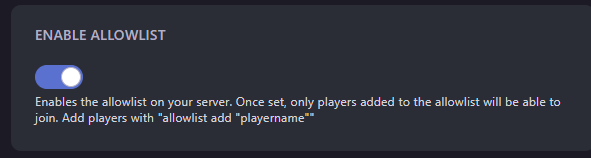
- Start your server
- Go to
Console - Add players to the allowlist by typing the following command into the console
allowlist add "playername" - You can remove players by typing
allowlist remove "playername"into the console
In addition to typing these commands into the console, you can type them from in game if you are set as an operator.
Make sure you enter the users name exactly how it appears in Minecraft, otherwise the command will not add the correct player
Self-Hosting/Other Providers
- Stop your server
- Open your servers files
- Locate
server.propertiesand open it - Look for
allow-listand set it to true
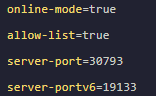
- Start your server
- Add players to the allowlist by typing the following command into the console
allowlist add "playername" - You can remove players by typing
allowlist remove "playername"into the console
In addition to typing these commands into the console, you can type them from in game if you are set as an operator.
Closing
Now you know how to keep troublesome players out of your server and restrict it to only your friends.
Get your own super powered and affordable Minecraft Bedrock server today!