

How to connect to S3 API using CloudBerry Explorer
You will need EC2 credentials for this guide. [You can learn how to create them here.](https://support.moonqube.com/article/56-how-to-generate- ec2-credentials)
First, Download CloudBerry Explorer from here.
Open CloudBerry. When prompted to select a Cloud Storage account, choose an S3 compatible account. Enter your access key and secret key. Your configuration should look something like this.
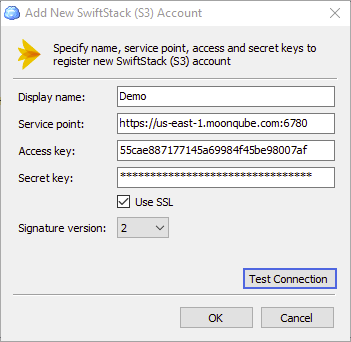
MoonQube Endpoints
https://us-east-1.moonqube.com:6780
Now you can select the account and transfer files into it using CloudBerry.