

How do I ban players on my Abiotic Factor server?
Quick Links
- Using AleForge’s Blacksmith’s Portal
- Self-Hosting/Other Providers
Abiotic Factor allows you to ban specific players on your server, preventing them from accessing your server.
Adding an Admin to your server
Make sure your server has been started at least once for it to generate the
appropriate config files for your server
Using Blacksmith’s Portal
- First, you’ll need to get the SteamID of the player you want to ban. You can do this by going to the player’s Steam profile and copying the link. The SteamID will be the long string of numbers at the end of the link

- Next, go to the Blacksmith’s Portal
- Go to
Files - Open
Config Files - Select the
Admin.inifile - Paste the SteamID of the player into one of the
BannedPlayerboxes
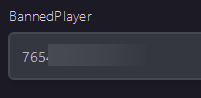
- If you only have one or two banned players you’d like to add, you can add them here. If you’d like to add more than that, select
View Fileand add them on another line - Restart your server, and the set player will be banned
Self-Hosting/Other Providers
- First, you’ll need to get the SteamID of the player you want to ban. You can do this by going to the player’s Steam profile and copying the link. The SteamID will be the long string of numbers at the end of the link
- Next, go to the install folder of the Abiotic Factor server
- Open
AbioticFactor/Saved/SaveGames/Server/Admin.ini - Look for
Moderator= - Paste the SteamID after this line so it looks like
BannedPlayer=<SteamID> - If you only have one two players you’d like to ban, you can add them here. If you’d like to add more than that, add an additional
BannedPlayer=line - Restart your server, and the set player will be banned.
Closing
Now, you can rest easy knowing that those players won’t be able to connect to your server.
Get your own super-powered and affordable Abiotic Factor server today!