

How do I turn off item drop on death in Hytale?
Quick Links
- Using AleForge’s Blacksmith’s Portal
- Self-Hosting/Other Providers
Hytale lets you turn off item drop on death, similar to the keep inventory gamerule in Minecraft. Here’s how you can turn that off on your server.
Turning Off Item Drop In Hytale
Using the Blacksmith’s Portal
- Open the Blacksmith’s Portal
- Stop your server
- Go to
Files - Open
universe/worlds - Open the folder that is your world name
- Open
config.json - Paste the following into your
config.jsonunder the"GameplayConfig"key.
"Death": { "RespawnController": {
"Type": "HomeOrSpawnPoint"
},
"ItemsLossMode": "Configured",
"ItemsAmountLossPercentage": 0,
"ItemsDurabilityLossPercentage": 10
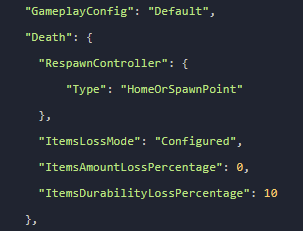
},5. Your server config should look like this. 6. Restart your server
Self-Hosting/Other Providers
- Stop your server
- Go to your servers installation directory
- Open
universe/worlds - Open the folder that is your world name
- Open
config.json - Paste the following into your
config.jsonunder the"GameplayConfig"key.
"Death": { "RespawnController": {
"Type": "HomeOrSpawnPoint"
},
"ItemsLossMode": "Configured",
"ItemsAmountLossPercentage": 0,
"ItemsDurabilityLossPercentage": 10
},5. Your server config should look like this.
- Restart your server
Closing
Now you know how to change your Hytale server to lose nothing on death!
Get your own super powered and affordable Hytale server today!