

How to run network diagnostics for your server
If you are experiencing networking issues like dropped packets or high ping, you can run network diagnostics to help troubleshoot and narrow down the issue. Support may ask you to run some of these commands as part of narrowing down your issue.
Running tracert
tracert shows the exact route a packet takes to get from your computer to
your server.
Windows
- Open Command Prompt
- Type
tracert your-server-ip
Mac and Linux
- Open Terminal
- Type
traceroute your-server-ip
This will take a moment to complete. If you are working with support, be sure to take a picture of your results and send it to support.
Be sure to leave off the port of your server otherwise the command will not
work correctly. This is the part after the colon of your server. e.g. :12345
Running MTR
Windows
- Download and install WinMTR
- Open WinMTR
- Type the IP of your server into the host
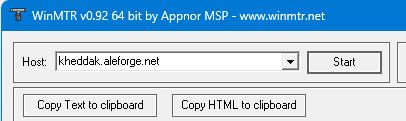
- Click
Startand let it run until 100 packets have been sent
Linux
- Install mtr. This may vary from distro to distro so we will leave this up to you.
- Open the terminal
- Type
mtr your-server-ip - Leave it running for at least 10 seconds. Press
sto pause the data collection.
Be sure to leave off the port of your server otherwise the command will not
work correctly. This is the part after the colon of your server. e.g. :12345