

How do I add myself as Admin on my Stationeers server?
Quick Links
- Using AleForge’s Blacksmith’s Portal
- Self-Hosting/Other Providers
Adding yourself as Admin in Stationeers allows you to use [console commands](https://help.aleforge.net/article/306-all-stationeers-console- commands) on your server. These are useful for moderating your server, as well as allowing you to give items and control storms
Adding yourself as Admin in Stationeers
Using the Blacksmith’s Portal
- Go to the AleForge Panel
- Click on
Startup - Set the
Admin Passwordvariable. Take note of this as you will need it later.
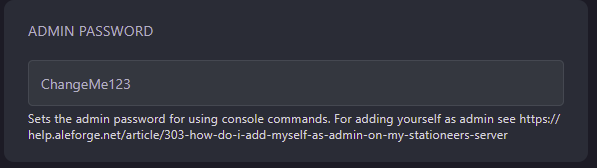
- Restart your server
- Go to the save directory on your computer for Stationeers. By default on Windows, this is located at
Documents/My Games/Stationeers - Right-click on
setting.xmland selectOpen With. Choose Notepad - Inside this file, look for
<ServerAuthSecret />. Replace it with<ServerAuthSecret>yourpasswordhere</ServerAuthSecret>
Self-Hosting/Other Providers
- Locate where your servers files are installed
- You will need to edit the startup command with the following line
-settings AdminPassword <youradminpasswordhere> - Once that has been edited, restart your server.
- Go to the save directory on your computer for Stationeers. By default on Windows, this is located at
Documents/My Games/Stationeers - Right-click on
setting.xmland selectOpen With. Choose Notepad - Inside this file, look for
<ServerAuthSecret />. Replace it with<ServerAuthSecret>yourpasswordhere</ServerAuthSecret>
Closing
Now you will be an admin on your Stationeers server. Anyone who wants to be an admin will have to repeat this process for their installation of Stationeers.
Get your own super powered and affordable Stationeers server today!