

How do I setup an SRV record for my Minecraft server?
An SRV record allows you to point a domain to the IP address of your Minecraft server. This guide will show you how to make one that points to your server.
We recommend using CloudFlare to setup records for your Minecraft server
Creating an A DNS Record
If you’re starting from scratch, you’ll first want to create an A record
pointing to the IP address listed on your server in the Dashboard of the
AleForge Panel. Your A record will want to look
something like this

Make sure that the IPv4 address is set to what is listed in the Dashboard of your panel.
Creating an SRV Record
Next, we’ll need to create an SRV record to point the domain to the correct port.
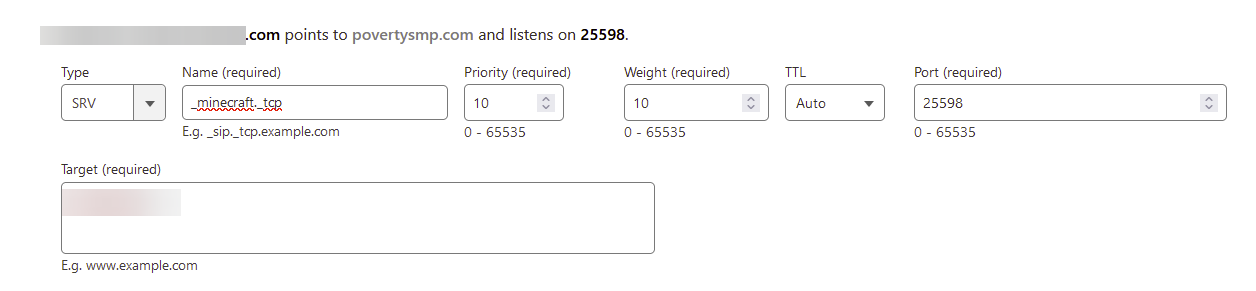
- Under name, enter the service name and the type of port. For Minecraft this is
_minecraft._tcp - Under priority, set it to 10
- Under weight, set it to 10
- Set Port to the primary port listed on the
Networkpage of the AleForge Panel - Set target to the domain you want pointing at your server
Depending on who you are using to manage your DNS records, it will take anywhere from a couple of minutes to a couple of hours for your DNS records to propagate to every DNS server. Once this process is done, your domain will be pointing at your Minecraft server.