

How do I add a password to my Project Zomboid server?
Adding a password to your Project Zomboid server is easy! This guide will show you how to do it.
- Go to the AleForge Panel
- Head to the
Consolepage and stop your server - Go to
File Managerand navigate to./cache/Server/dedicated.ini - Look for Password and set this to what you want the password to be
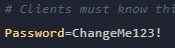
- Click
Save Content - Go back to the Console page and start your server.
Your server will now prompt you for a password when you try to login.
Please note that your .ini file will be named differently if you changed the
name of your save from the Startup section of the panel.