

How do I use ForgeMaster Discord Bot?
AleForge provides a Discord bot named ForgeMaster to allow customers to manage their servers and display their status in the AleForge Discord or customers’ own Discord channels.
How do I use ForgeMaster in AleForge
To get started to be able to use ForgeMaster in you need to complete a few steps.
AleForge will provide limited support for using ForgeMaster outside our Discord server. Use at your own risk.
- Open the AleForge panel and go to the API page
- Add a Description and click
Create - Copy the provided API key. It will only be displayed once
- Next, go to #bot-commands in Discord
- Input the command
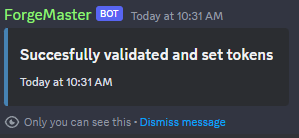
/userconfand input your token. Once done, hit enter, and the bot will store your API key to your Discord user.
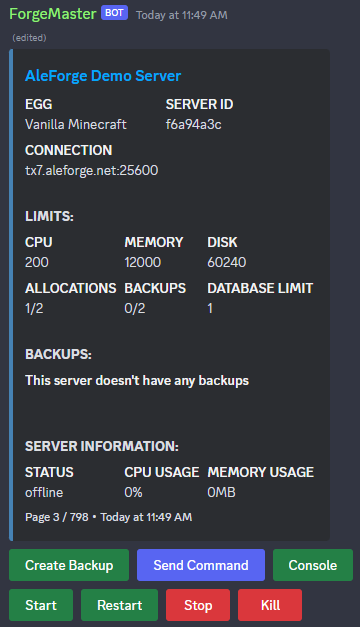
- Once the API key is set run the /servers command to and your servers should be shown.
Inviting ForgeMaster to Your Discord Server
You can also run ForgeMaster on your own Discord server.
- Open the AleForge panel and go to the API page
- Add a Description and click
Create - Copy the provided API key. It will only be displayed once
- Invite the bot to your server using this link
https://discord.com/oauth2/authorize?permissions=395204324416&scope=bot%20applications.commands%20applications.commands.permissions.update&client_id=1211686667333799976
- Once the bot joins your server, run
/set adminrole youradminrole - Next, run
/set tokens yourapitokento set up your admin - Now run
/serversto verify the token is functioning
ForgeMaster Commands
| Command | Admin | User | Description |
|---|---|---|---|
| /help | 🗹 | 🗹 | Shows all commands available |
| /console | |||
| 🗹 | Shows console for 2 minutes, can be refreshed to extended time (see | ||
| /liveserver for permanent) | |||
| /backups | |||
| 🗹 | Shows backups, and allows to create, delete, and lock backups. | ||
| /rename | |||
| 🗹 | Rename a server | ||
| /send | |||
| 🗹 | Send a command to the server | ||
| /servers | |||
| 🗹 | It shows all servers, and has action buttons for starting, stopping, | ||
| console, etc. | |||
| /userconf | |||
| 🗹 | Configure your own api key as a user | ||
| /liveserver | |||
| 🗹 | Allows the creation of a server embed, which continuously updates and has | ||
| buttons for starting and stopping. | |||
| /set | 🗹 | ||
| A place to set bot settings |