

How do I connect to my Bedrock server?
Quick Links
- Using AleForge’s Blacksmith’s Portal
- Self-Hosting/Other Providers
Once you’ve bought a Bedrock server, it’s time for you and your friends to connect. Here’s how you can connect to your server.
Connecting to your server
Using Blacksmith’s Portal
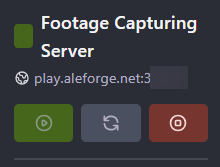
- Open the Blacksmith’s Portal
- Take note of the hostname and port of your server, e.g.
play.aleforge.net:12345
- Open Minecraft Bedrock
- Click
Play - Select
Servers

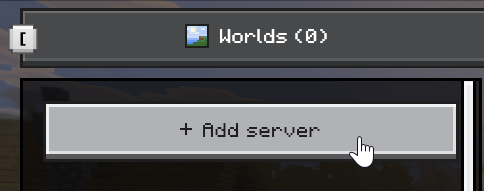
- Click
Add server
- Give your server a name. Then, under
Server addressput in the IP or hostname of your server, e.g.play.aleforge.net - Under port, put in the numbers after the colon in your address, e.g.
12345
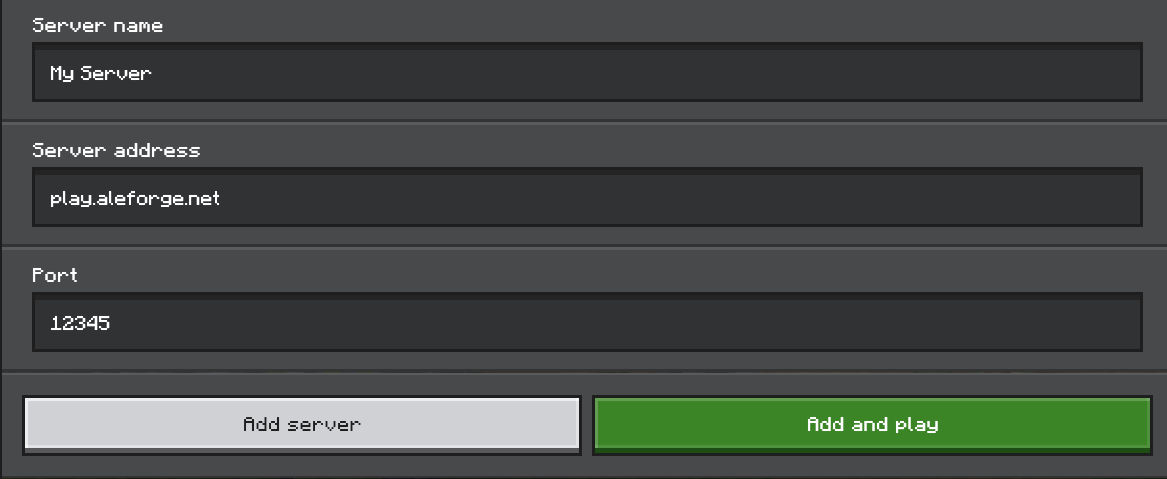
- Now, select
Add and playand you will begin connecting to your server!
Self-Hosting/Other Providers
- Find the IP address of your server. If you’re self hosting you can use a website such as https://www.whatismyip.com/ to discover your IP.
- For the port, you’ll want to use the one you configured to use on your server
- Open Minecraft Bedrock
- Click
Play - Select
Servers
- Click
Add server
- Give your server a name. Then, under
Server addressput in the IP or hostname of your server, e.g.play.aleforge.net - Under port, put in the numbers after the colon in your address, e.g.
12345
- Now, select
Add and playand you will begin connecting to your server!
Closing
Now you can get playing! Get your own super powered and affordable Minecraft Bedrock server today!