

How do I add admins to my SCUM server?
You can add players as admins to your SCUM server to allow them to use commands to help moderate and manage your server. Here’s how you can add them to your server.
You’ll need the Steam64ID of the user you are wanting to add as admin. You can find out how to do that with this guide.
Adding Admins to your SCUM server
- Open the Blacksmith’s Portal and go to
Files, if self-hosting open the directory that your SCUM server is installed in - Go to
SCUM/Saved/Config/WindowsServer - Open
AdminUsers.ini - Add the Steam64ID of the player you want to make admin:
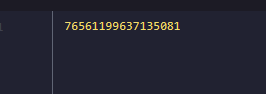
- You can also add additional arguments to allow the players additional commands
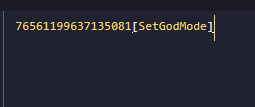
- Restart your server
| Additional Arguments | Description |
|---|---|
| [SetGodMode] | Allows the admin to use the setgodmode command |
| [RestartServer] | Allows the server to use restartserver pretty please |
| command |
Closing
Now you know how to create admins on your SCUM server!
Get your own super powered and affordable SCUM server today!