

How do I Join a Project Zomboid Server?
Directly connecting to your AleForge Project Zomboid server is super easy. Just follow the steps below.
Steps
- Launch Project Zomboid
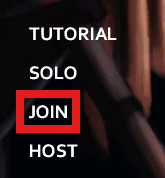
- In the main menu click
Join
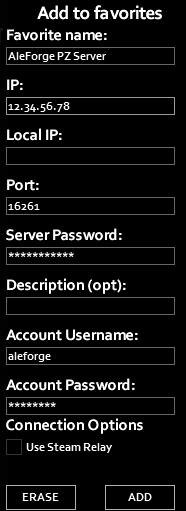
- Enter your information from the
Server Dashboardto theAdd to favorites
Favorite name can be whatever you want
Local IP needs to be left blank
The Description is optional and not required
Your Account Username and Account Password will be whatever you set here
the first time and will be used for all future connections to the server
Fill out the IP with either the Hostname or IP address from the
Dashboard
Add the Port that is after the : for the Hostname on the Dashboard
Server Password will be the password you set on the Startup page in the
panel
 PZ Server Add
- Click
Add - Next, click
Join Server