

How do I remove a chunk in my Minecraft world?
Minecraft divides the world into 16x16x384 “slices” of the world. These “slices”, called chunks, contain all the blocks in your Minecraft world.
Sometimes, especially when playing modded, these chunks can get corrupted and cause significant lag on your server, or even cause the server to crash when they are loaded. In this guide, we’ll teach you how to remove them using MCA Selector
Preparing your world for chunk editing
- Download MCA Selector
- Locate or download your Minecraft world. If hosting with AleForge, you can follow this guide.
- Make a copy of your world as a backup
- In MCA Selector, go to
File -> Open World, then choose the save folder of your Minecraft world. - You will now be prompted to choose a dimension. The first option will always be the name of your world and corresponds with the Overworld,
DIM1is the Nether, andDIM-1is the End
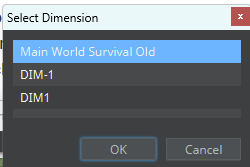
- Your world will now be opened in MCA Selector
Deleting chunks in your world with MCA Selector
- Left click and drag to select chunks in MCA Selector
- Once selected, go to
Selected -> Delete Selected Chunks
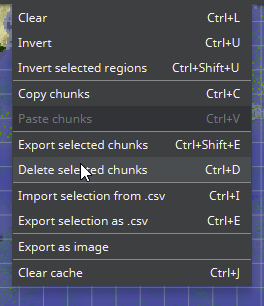
- You will be asked to confirm your decision
- Once you confirm, the chunks will be removed from your world. Now you can reupload your world file to your server and your uploaded world will no longer have the chunks you removed in it.
Closing
Now you know how to remove problematic chunks in your Minecraft world!
Get your own super powered and affordable Minecraft server today!