

How to Set Yourself as Admin in Project Zomboid
It is a good idea to have a couple of admins on your server. [This gives you access to several commands that are useful for banning/kicking problematic](https://help.aleforge.net/article/282-how-to-use-admin-commands- in-project-zomboid) players. This guide will walk you through setting your player as an Admin on your Project Zomboid server.
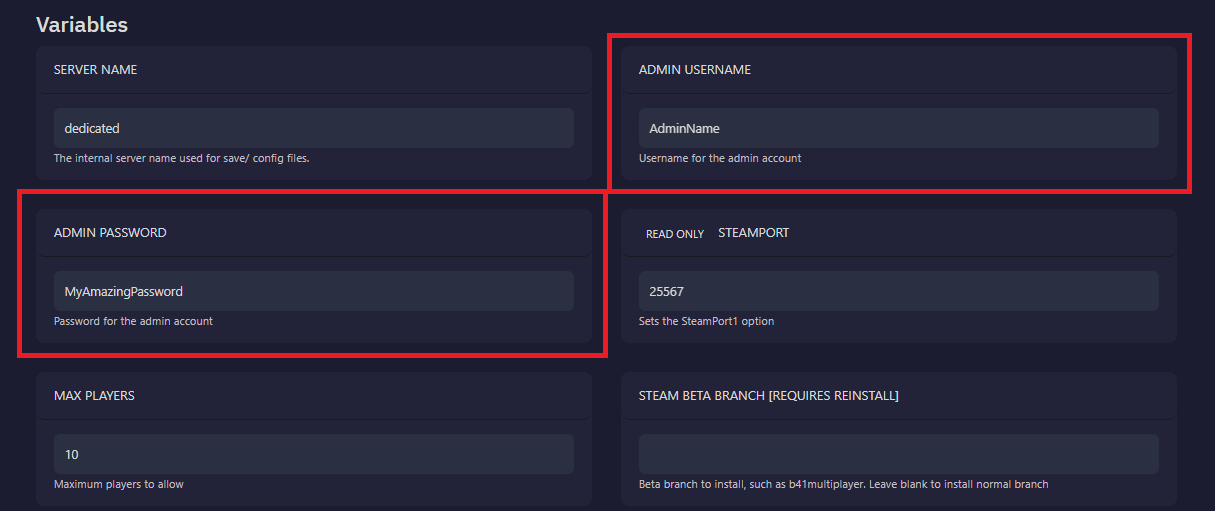
Set The Server Admin Password
- Open the
Startuppage of your server - Change the
Admin Usernameto whatever you wish - Set the
Admin Passwordto a secure password - Restart the server to pick up the change
How to Log In as an Admin on Your Project Zomboid Server
- Open Project Zomboid
- Click
Joinfrom the main menu - Where you usually enter your server account username, enter your
Admin Username - In the Account, Password field, enter the
Admin Passwordyou set earlier - Connect to the server using your admin credentials
Now you will have admin access in-game. You can look for the red Admin text next to your nametag to confirm this worked.
Common Issues
I am not listed as admin:
This usually means that the admin username was typed in incorrectly.
- Double check the username matches the exact name you typed on the Startup page
- Restart the server to make sure the password change is loaded on your server
Wrong username or password:
When you see this error, it means either the admin username or password was incorrect
- Double check the username matches the exact name you typed on the Startup page
- Re-enter the password to confirm it is typed correctly
- Restart the server to make sure the password change is loaded on your server