

How do I change my Killing Floor 2 server's gamemode?
This guide will walk you through changing the game mode of your Killing Floor 2 server.
Changing the Game Mode
- Access the Web Admin page of your server
- Go to
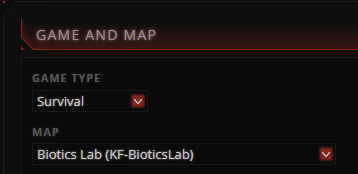
Change Map - Under
Game and Mapchange the map and game type you’d like for your server
- Click
Change Gameto confirm the changes
Closing
Now, your server will change to the set map and game type.
Get your own super-powered and affordable Killing Floor 2 server today!