

How do I configure building decay on my Rust server?
Quick Links
- Using AleForge’s Blacksmith’s Portal
- Self-Hosting/Other Providers
Rust has building decay mechanics that allow buildings to decay slowly over time, meaning that players may have to repair buildings in their bases. Server owners can change the rate at which decay happens and can even disable it entirely.
Changing when your Rust server resets
Using Blacksmith’s Portal
- Open the Blacksmith’s Portal
- Go to
Startup - Locate
Additional Arguments - Enter
+decay.scale "<multiplier>"
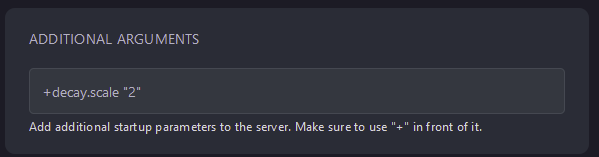
- Restart your server
This value works as a multiplier, so setting it to 2 will double the decay rate, while setting it to 0 will disable decay entirely.
Self-Hosting/Other Providers
- Locate where your server is installed
- Find the startup script and open it and edit it
- Add
+decay.scale "<multiplier>"to the end of the command - This value works as a multiplier, so setting it to 2 will double the decay rate while setting it to 0 will disable decay entirely.
- Save the file
- Restart your server
Closing
Now you know how to adjust building decay. Disable it entirely, quadruple it, or put it somewhere in between!
Get your own super-powered and affordable Rust server today!