

How do I set permissions for my Return to Moria server?
Quick Links
- Using AleForge’s Blacksmith’s Portal
- Self-Hosting/Other Providers
- List of Permissions
Moria allows you to set specific permissions for different users on your server. Here’s how you can do that on your server.
Setting permissions on your Return to Moria server
Using Blacksmith’s Portal
- Open the Blacksmith’s Portal
- Stop your server
- Go to
Files - Open
MoriaServerPermissions.txt - Scroll down to the bottom and add the player’s name followed by the permissions you’d like them to have. You can also change the default permissions players are given by changing the permissions after
Default =
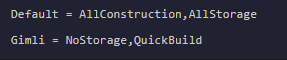
- Save the file
Self-Hosting/Other Providers
- Ensure your Return to Moria server is stopped
- Open the folder where your server is installed
- Open
MoriaServerPermissions.txt - Scroll down to the bottom and add the players name followed by the permissions you’d like them to have. You can also change the default permissions players are given by changing the permissions after
Default =
- Save the file
List of Permissions
| Permission Name | Description |
|---|---|
| NoConstruction | Prevents the player from using any build or quick-build |
| functions and from deconstructing any player constructions. | |
| QuickBuild | Allows the player to quick-build platforms and rope ladders but |
| prohibits other construction or deconstruction | |
| AllConstruction | Grants full permissions for both construction and |
| deconstruction. |
NoStorage| Prevents the player from interacting with player-constructed
storage containers and from using base storage for crafting.
AllStorage| Allows the player to interact with player-constructed storage
containers and use base storage for crafting.
Closing
Now you know how to set permissions for your Return to Moria server!
Get your own super-powered and affordable Return to Moria server today!