

How do I reset player passwords?
If your player forgets their password for Project Zomboid, you’ll have to reset it. There are a couple of different ways you can do this.
Resetting the Password In-Game
- Connect to your server and login to an account with admin rights
- Enter the command
removeuserfromwhitelist usernameand replaceusernamewith the players name - The next time that player joins they can set a new password
Note that when using this method the playersadmin roles will be removed but can be re-added when they join back
Editing the Server Database File
- Open the AleForge Panel
- Stop your server
- Go to
Files - Navigate to
.cache/db - Download your servers
.dbfile to your computer. By default this is calleddedicated.db - Download SQLite Browser and open
dedicated.dbwith it - Select
Browse Dataand then selectwhitelistin the dropdown
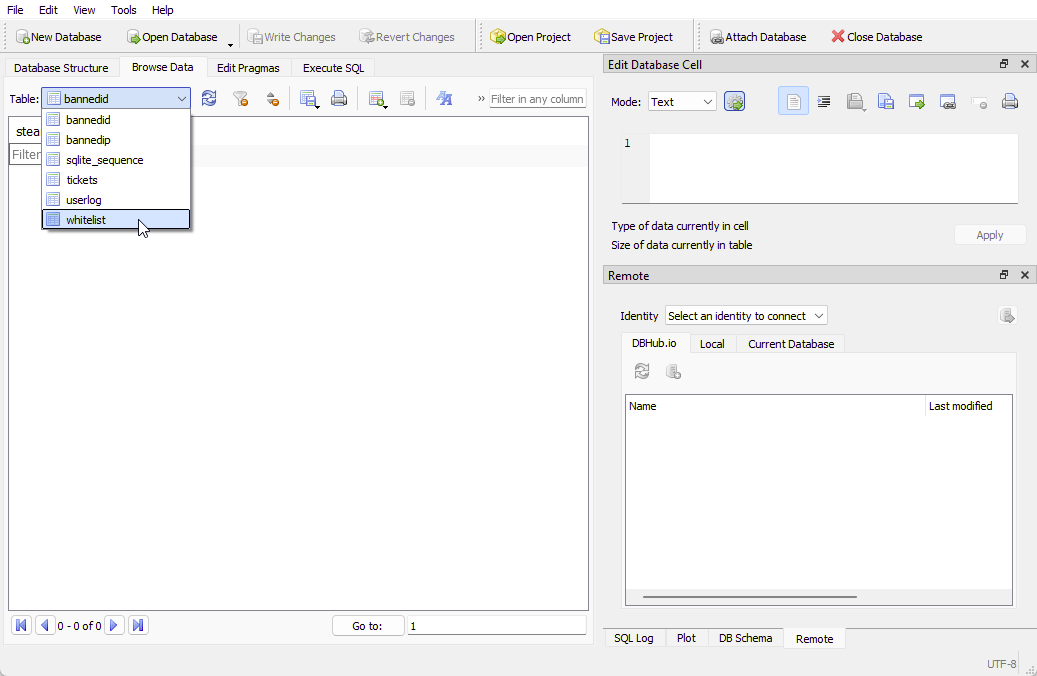
- Find the user in the database file. Once found, double click on the password section and delete it

- Note that the password found here is the encrypted version of that users password
- Save the file and reupload it to your server. Be sure to overwrite the old
dedicated.dbfile - Start your server
The player who you edited will now be able to set a new password on login