

How do I change how often my Rust server saves?
Quick Links
Rust has building decay mechanics, which allow buildings to decay slowly over time meaning that a player may have to repair buildings in their bases. Server owners can change the rate at which decay happens and can even disable it entirely.
Changing when your Rust server resets
Using Blacksmith’s Portal
- Open the Blacksmith’s Portal
- Go to
Startup - Locate
Save Interval - Change it to your desired interval in seconds
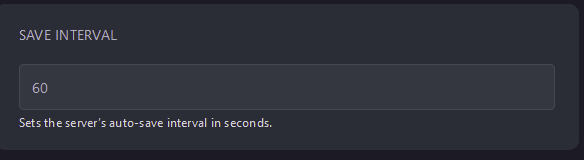
- Restart your server
If you’d like to make backups of your server as well, see our guide for making [automatic backups with the Blacksmith’s Portal](https://help.aleforge.net/article/144-how-do-i-setup-an-automated- backup-of-my-server)
Self-Hosting/Other Providers
- Locate where your server is installed
- Find the startup script and open it and edit it
- Add
+server.saveinterval <seconds>to the end of the command - Save the file
- Restart your server
Closing
Now, you can adjust your save interval to suit the needs of your server.
Get your own super-powered and affordable Rust server today!