

How to install Steam Workshop Mods on your No More Room In Hell server
No More Room In Hell supports Steam Workshop mods, which means you can add new maps, guns, items, and other features to your server.
Installing Workshop items for No More Room In Hell simple and easy and will work on any host. This guide will walk you through installing them on your server.
Finding Workshop Mods
- Go to the No More Room In Hell Workshop
- Find the mods you’d like to install and make a list of their Workshop IDs. The Workshop ID can be found in the link to the mod. e.g.
 In this example, the Workshop ID of this mod
is 3356980501
In this example, the Workshop ID of this mod
is 3356980501
- Now that we have our list, we can move to installing mods on our server.
Installing Workshop Mods
- If you are an AleForge customer, go to the AleForge Panel and select your server
- Go to the Console
- Enter the command
workshop_download <mod_id>and your server will begin downloading your mod.
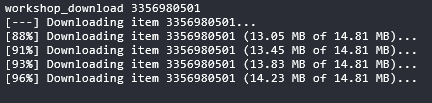
Repeat this process to install all of your mods and they will be installed on your server!